
Custom Systems
Software shaped around how the work actually moves.
BRS designs custom business systems for Melbourne businesses, including quoting tools, calculators, internal CRMs, portals, booking workflows and reporting tools where generic software does not fit the operation.
Discuss an internal systemBefore development
The interface is not the first thing to define.
Operational software sits inside a chain of responsibilities and decisions. Before development begins, BRS models the parts the system needs to support.
- 01
People
Who enters information, reviews it, approves it and needs visibility.
- 02
Information
What the system receives, where it comes from and which records stay connected.
- 03
Rules
What can be calculated or validated consistently and what changes the next step.
- 04
Exceptions
What happens when information is missing, duplicated, late or outside the normal path.
- 05
Outputs
The quote, booking, task, report, notification, decision or reliable record produced.
That model gives the interface and technical architecture something real to follow.
Operational forms
Different tools for different points of friction.
- Quoting tools
- Capture the inputs behind a price and produce a consistent result with an appropriate review path.
- Calculators
- Turn repeated formulas and business rules into a usable guided experience.
- Internal CRMs
- Organise the relationships, records and next actions that matter to a specific operation.
- Portals
- Give customers, partners or staff secure access to relevant information and actions.
- Booking workflows
- Coordinate availability, requests, confirmations, changes and operational follow-up.
- Administration and reporting
- Bring records, statuses, responsibilities and operational priorities into a clearer working view.
Operational tooling
BRS-built product · Live
Connected bookings and portfolio activity
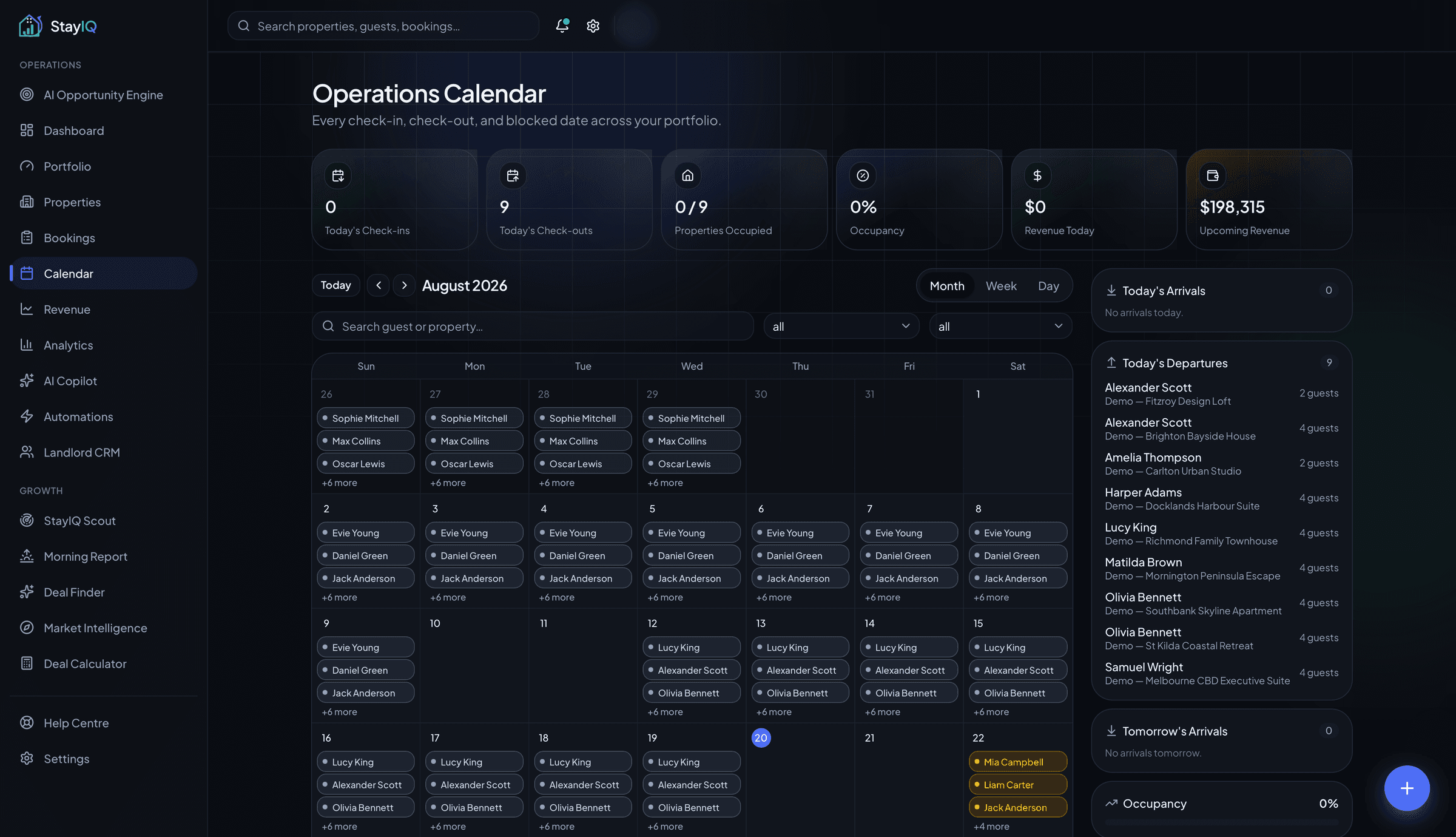
StayIQ coordinates bookings and portfolio activity inside one authenticated system.
StayIQ connects account-scoped property and booking information with operational views. Its calendar brings check-ins, check-outs, booking periods, arrivals and departures into a shared portfolio workflow.
This is evidence of modelling connected records, dates, statuses and operational outputs. StayIQ is a BRS-built product, not a client software case study.
Technical judgment
Custom does not automatically mean build everything.
An existing product may already solve the core requirement well. In that case, configuration or integration can be more responsible than creating another system to maintain.
A custom build becomes more appropriate when the operation depends on specific rules, connected workflows or interfaces that available tools cannot support without excessive compromise.
Under the interface
Normal paths, edge cases and recovery belong to one system.
A custom system may need authentication, permissions, validation, calculations, connected records, integrations, administration and reporting. These elements should make status clear, prevent avoidable errors and help people recover when work leaves the ideal path.
From operation to working system
Make the workflow explicit before making it permanent.
- 01
Understand
Observe the current tools, responsibilities, information and points of friction.
- 02
Model
Define people, records, rules, exceptions and required outputs.
- 03
Decide
Compare custom development, configuration and integration options.
- 04
Design
Shape the interface around real tasks, decisions and system states.
- 05
Build and test
Implement normal paths, edge cases, permissions and recovery.
- 06
Improve
Refine the workflow as real use reveals stronger priorities.
Show BRS where the operation stops fitting the software.
Start with the people, information and decisions involved. BRS can determine whether the right answer is a custom system, an integration or a better use of the tools already in place.